
What is a printer's bleed?
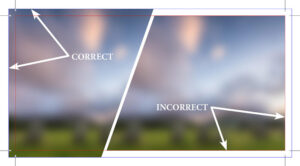
A printer's bleed is the extension of an image past the edge of the document. This ensures there will be no white lines once the document is trimmed.
In this diagram the document is 3.5” x 2”. The text is .25” from the edge of the document so that when the document is cut down it won’t be cut off. It is very important not to have any text too close to the edge of the document.
The background image extends past the document edge by .125” so that when the document is cut down there won’t be white space or gaps.
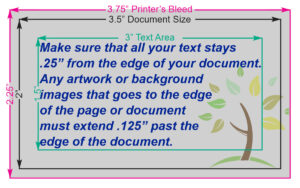
When printed sheets are cut, the trimming equipment has a small tolerance for movement. If artwork stops exactly at the edge of the finished size (document size), even a tiny shift during cutting can leave an unwanted white strip along the edge. By extending the artwork into the bleed area, the printer can trim the piece slightly off-center and still have the color or image run cleanly to the edge. In the diagram below anything outside the pink border will be trimmed off.
What do I need to do to prepare a book?
When preparing a book a few things need to be considered:
Quantity: This will determine if the book will be printed on an offset or digital press.
Book Size: Common finished sizes are 5.5”x8.5”, 6”x9” (common novel sizes), 8.5”x11” (common for manuals), etc.
Page Count: This determines the spine width, binding options, paper requirements, etc. The page count needs to be in a multiple of 4, ie 4, 8, 12, 16....
Paper Selection: This determines the weight of the paper, if the paper is matte or glossy, the thickness of the cover.
Colour of ink: This determines if the cover and inside pages are printed in colour ink or in black ink only.
Bleeds: This determines if any images go to the edge of the finished size of the document. (See "What is a printer's bleed?" above)
Margins and Gutters: This is the white space that borders the text on the inside pages. These will differ depending on how you will have your book bound.
All the above considerations affect the cost of the book. It is best to have these predetermined (as close as possible) when asking for a quote to ensure an accurate quote.
What are the different ways a book can be bound?
There are many methods of binding a book. Below are the four binding options offered by Haines Printing. While we also offer case binding, it is available only for large production runs and is completed by one of our trusted external partners rather than in-house.
Sad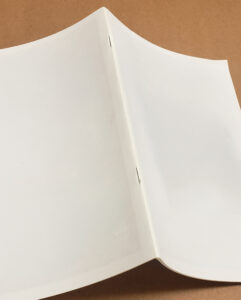 dle Stitch: Pages are folded in half and stapled in the fold (spine).
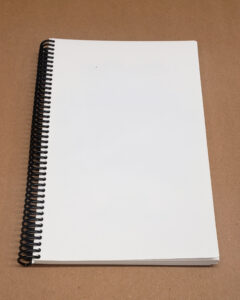 Coil Bound: The book is punched with multiple small holes and is fastened together by a spiral plastic.
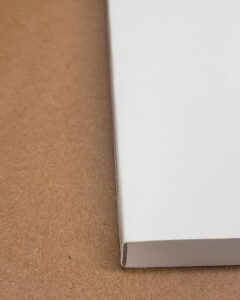 Perfect Binding: The book is glued at the spine and the cover is glued and wrapped around the pages, ie a paperback book.
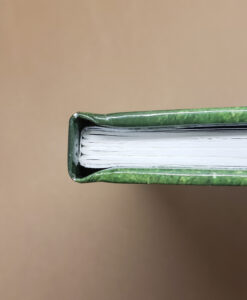 Case Binding: The inside pages are sewn together in sections and the sections are glued together to the end papers that are glued to the cover’s spine. (Only available in large quantities and are not done in-house.)
What is the difference between CMYK vs RGB vs Spot Colour?
Cyan
Magenta
Yellow
K (Black)
is used for printing on an offset/digital press or large format printer to print items like brochures, postcards, flyers, posters, etc.
Red
Green
Blue
is used for websites, social media, etc.
A spot colour is a premixed ink that is printed separately rather than being created by combining CMYK inks. It is best used for company logos, brand colors, metallic inks (gold, silver), fluorescent colors, white ink on dark paper or when an exact color needs to be matched.
What is image resolution?
Image resolution is the sharpness of an image which is measured in dpi’s (dots per inch). A high resolution image for printing is 300 dpi. A low resolution image would be used for websites/social media, at 72 dpi.
What is the difference between a vector image and a bitmap image?
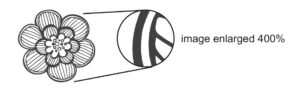
A vector image is an image created using points, lines and curves which allows for infinite scaling. It can also be edited. Some image formats are eps, ai and svg.
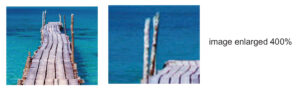
A bitmap image is an image created using pixels or tiny dots/squares which are assigned a colour. Bitmaps have limited scaling allowances and once enlarged too much the image becomes blurry. Some image formats are png, jpeg, gif, tiff.
What does it mean when a printer asks what stock you want?
Stock refers to the paper or product the document will be printed on.